HeyGen Assistant by Kaleem Khan
Create videos faster and make your HeyGen workflow easier
HeyGen Assistant by Kaleem Khan is a helpful Chrome extension designed for people who use HeyGen to create videos, presentations, lessons, marketing content, social media videos, and client projects.
Support the extension for just $5 and help keep it improving with better features, updates, and fixes.
A smoother workflow for HeyGen video creators
Creating videos can take time. You may need to prepare scripts, manage scenes, check your content, render videos, download files, and repeat the same workflow many times.
HeyGen Assistant by Kaleem Khan is built to support that process and make your work feel more organised, faster, and easier to manage.
See the Extension in Action
Take a look at how the extension integrates into your browser to speed up video production.
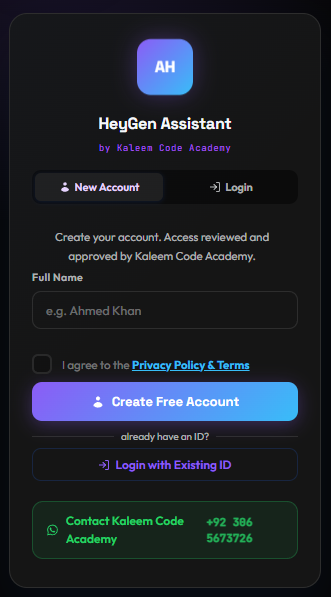
1. Quick Registration
Access is securely managed and approved by Kaleem Code Academy. Connect with a simple login or create a free account to begin.
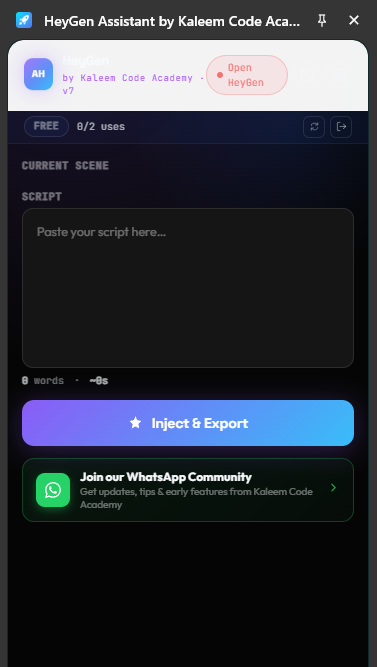
2. Script Injection Panel
Paste script texts directly, check word count and video estimates, and inject and export text blocks directly to the HeyGen editor scene with one click.
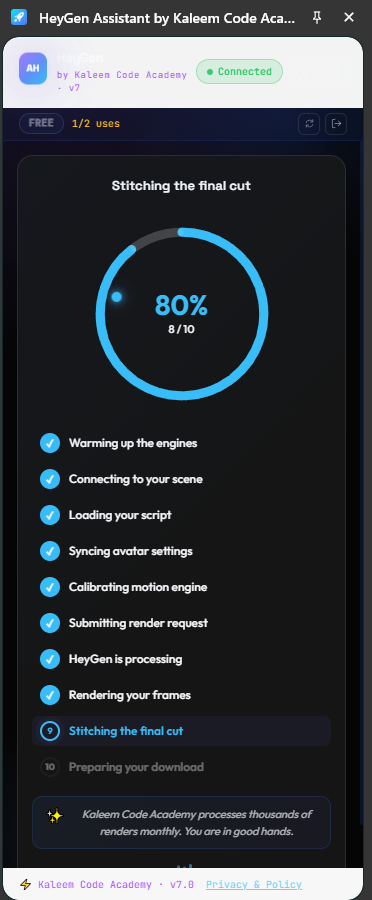
3. Automated Render Pipeline
Track the automated rendering checklist in real-time. The extension syncs settings, submits requests, and stitches frames in the background.
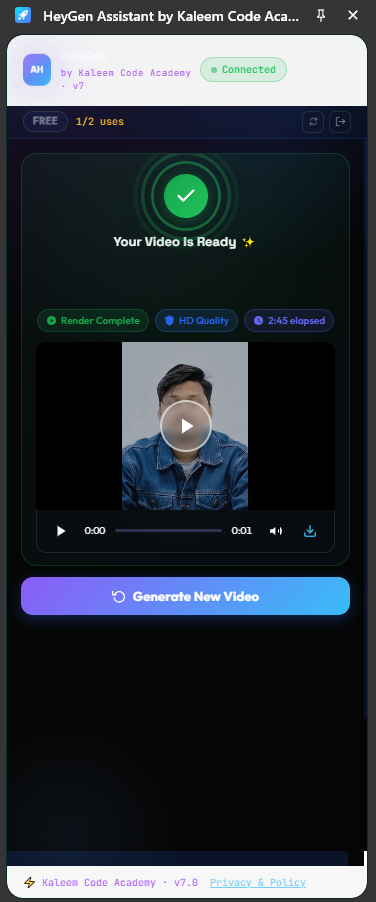
4. Render Completion
Get notified immediately when your video is ready. Preview, watch the render elapsed time, download in HD quality, and start your next video creation in seconds.
Why use this extension?
Instead of repeating the same steps again and again, this extension helps make the process smoother, faster, and easier to manage.
It is especially useful for:
Key Benefits
1. Save Time
The extension helps reduce repetitive work and makes your HeyGen video creation process quicker. This is useful when you are creating multiple videos or working on regular content.
2. Easier Workflow
You can keep your video creation steps more organised. A smoother workflow means less confusion and more focus on the actual content.
3. Better for Regular Video Creation
If you create videos often, small time savings can make a big difference. This extension helps support a faster and more comfortable process.
4. Helpful for Course Creators
Teachers, trainers, and online course creators can use it to speed up educational video production for lesson videos, explainer videos, and training content.
5. Useful for Marketing Videos
If you create promotional videos, product videos, or social media content, the extension can help you manage the process more smoothly.
6. Simple and Clean Interface
The extension is designed with a simple layout, making it easier to use without too much clutter. The dark theme gives it a modern and professional feel.
7. Great for Freelancers and Agencies
Freelancers and agencies who create videos for clients can benefit from a faster workflow when managing repeated video tasks.
8. Supports Productivity
The goal of this extension is simple: help you create more in less time. It supports productivity without making the process complicated.
Who is this for?
This extension is a good fit for anyone who wants to make HeyGen video creation easier and faster.
You may find it helpful if you:
- ✓ Create videos every week
- ✓ Make content for clients
- ✓ Build online courses
- ✓ Create marketing videos
- ✓ Teach online
- ✓ Manage social media content
- ✓ Want a smoother HeyGen workflow
How to Install & Use
Follow these simple steps to install the extension, activate your account, and start creating videos.
Download & Install the Extension
Download the extension folder in a ZIP file from our GitHub repository and extract it to a folder on your computer.
- Open Google Chrome and navigate to
chrome://extensions/. - Enable Developer mode (toggle switch in the top-right corner).
- Click on Load unpacked and select the extracted extension folder.
- Pin the extension by clicking the Chrome Extensions puzzle icon and clicking the pin icon next to HeyGen Assistant by Kaleem Code Academy.
Register Your Account
Click on the pinned extension icon to load the popup, open the registration screen, and register.
- Enter your full name in the registration field.
- The extension will generate a unique Login ID for you on the Approval page. Make sure to copy and save this ID for future use!
- Click the WhatsApp contact button below to message us directly. Send us your name and generated Login ID.
Your account will be activated by our team within a few minutes.
Configure & Generate Videos
Once activated, open HeyGen and start creating videos easily without wasting your video rendering credits.
- Go to your **HeyGen Dashboard**, select your desired avatar, and configure all voice, templates, and scene options.
- Instead of typing in the HeyGen editor box, open the **HeyGen Assistant** extension panel from your browser bar.
- Paste your script text in the extension script text box.
- Click the **Inject & Export** button.
- The extension will automate the render pipeline in the background and present the final video player. Preview and download your video in HD!
Buy Me a Coffee — Just $5
This extension takes time, testing, and effort to improve. If you find it useful, you can support the project by buying me a coffee for just $5.
Your support helps with:
- ✓ Future updates
- ✓ Bug fixes
- ✓ New features
- ✓ Better design
- ✓ Continued development
Support the extension
A small $5 support means a lot and helps keep this project moving forward.
Simple, practical, and helpful
HeyGen Assistant by Kaleem Khan is not made to complicate your work. It is made to make your work easier. The extension focuses on simple support, cleaner workflow, and better productivity for video creators.
Get started
Install the extension, open HeyGen, and start creating videos with a smoother workflow. If you like the extension, please support the project with just $5.
HeyGen Assistant FAQs
What is HeyGen Assistant by Kaleem Khan?
HeyGen Assistant by Kaleem Khan is a Chrome extension designed to help people who use HeyGen make their video creation workflow smoother, faster, and more organised.
Who is this extension for?
It is useful for content creators, teachers, trainers, digital marketers, freelancers, agencies, course creators, small business owners, and anyone who regularly creates videos with HeyGen.
Is this extension free?
Yes, you can download the extension for free from our GitHub repository. If you find it useful, you can support the project by making a small $5 contribution, which helps with future updates, bug fixes, and continued development.
Is this extension officially affiliated with HeyGen?
No. HeyGen Assistant by Kaleem Khan is an independent helper extension and is not officially affiliated with, endorsed by, or sponsored by HeyGen.
How does this extension help save time?
It is designed to support repeated video creation workflows and help users keep their HeyGen process more organised, which can reduce friction when creating regular videos.
Can course creators use this extension?
Yes. Teachers, trainers, and course creators can use it to support the production of lesson videos, explainer videos, presentations, and training content.
Where do I get support or request improvements?
You can get support or request improvements by reaching out via our contact email hello@kaleemkhan.co.uk or through our request a quote form.
HeyGen is a trademark of HeyGen Inc. HeyGen Assistant by Kaleem Khan is an independent browser helper utility and is not affiliated, associated, authorized, endorsed by, or in any way officially connected with HeyGen or any of its subsidiaries or affiliates.