Inspect Freeze by Kaleem Code Academy
Freeze your Inspect Element changes and keep them after refresh
Inspect Freeze by Kaleem Code Academy is a free Chrome extension that helps you save the changes you make with Inspect Element, so your edited page stays the same even after refreshing.
This extension is free. If it saves you time, you can support future updates, fixes, and improvements for just $5.
What is Inspect Freeze?
Inspect Freeze by Kaleem Code Academy is a simple Chrome extension created for people who use Inspect Element to test page edits, preview content changes, adjust layouts, experiment with text, or demonstrate website changes.
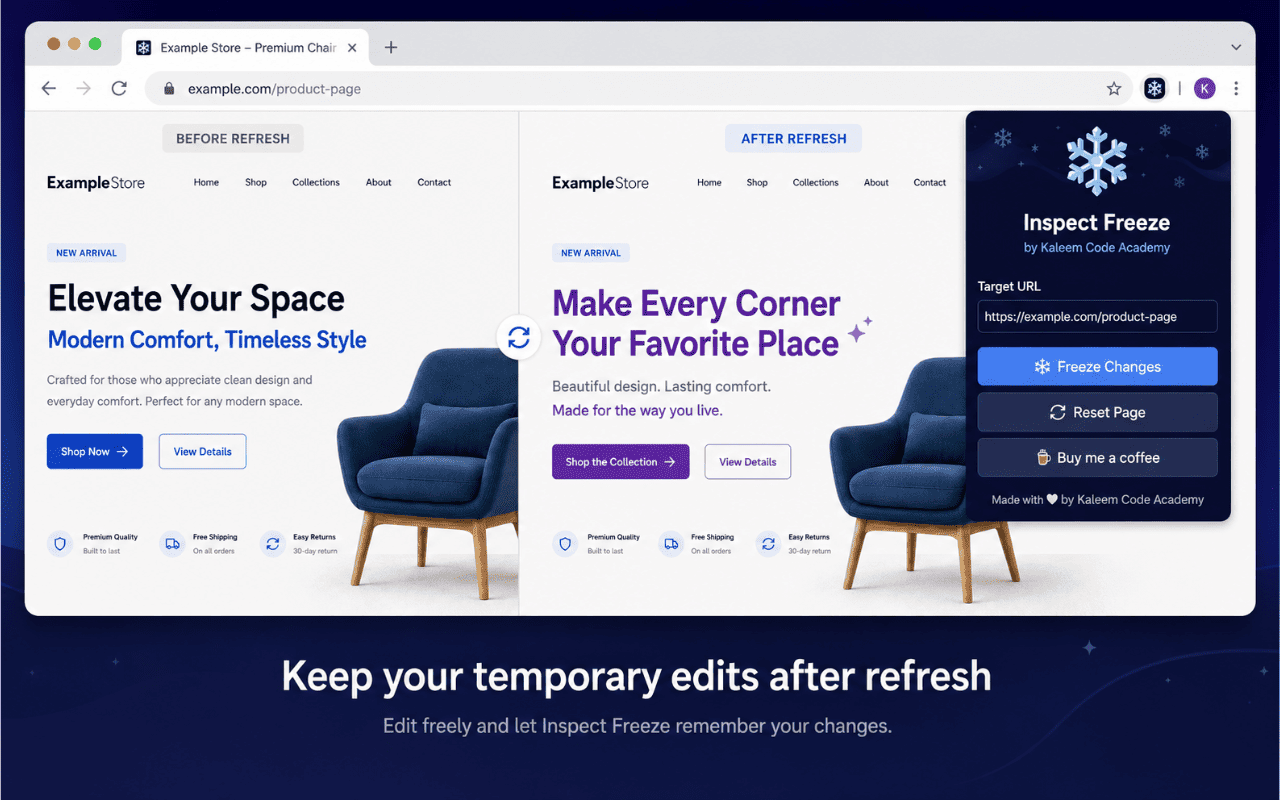
Normally, when you make changes using Inspect Element and refresh the page, those changes disappear. Inspect Freeze helps you save those temporary edits for the current page, so they can appear again after refreshing.
This makes it useful for designers, developers, students, tutors, marketers, website owners, QA testers, and anyone who wants to preview page changes without editing the real website files.
Why use Inspect Freeze?
Inspect Element is useful, but it has one big limitation: changes are temporary. If you refresh the page, your edits are gone. Inspect Freeze helps reduce that frustration by letting you save your edited page state and reset it when needed.
It can help when you want to:
- ✓ Preview text changes on a live page
- ✓ Test design edits before sending feedback
- ✓ Demonstrate website changes to a client
- ✓ Practice HTML/CSS editing
- ✓ Compare layout ideas
- ✓ Save temporary browser-side edits for review
- ✓ Reset the page when you no longer need the saved version
Key features
Freeze Inspect Element Changes
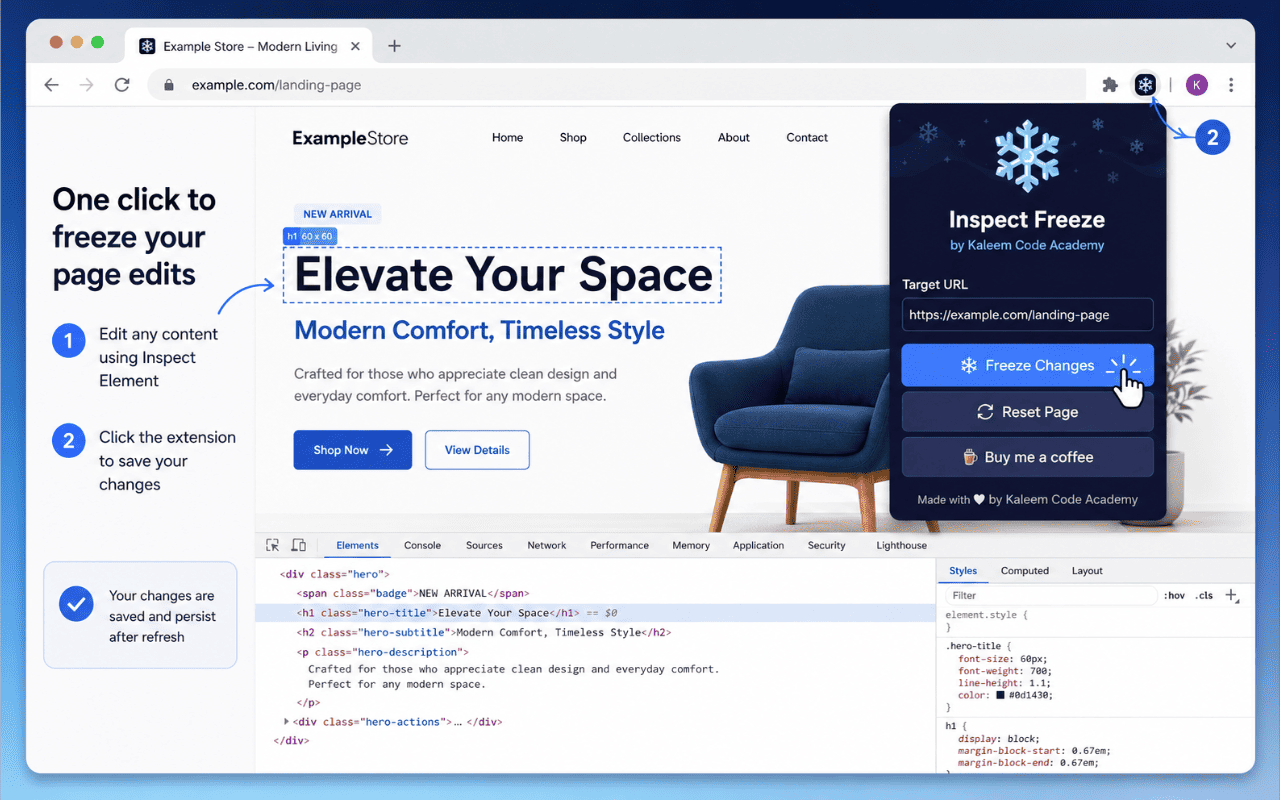
Make changes using Inspect Element, then use the extension to save the edited page state.
Keep Edits After Refresh
Saved changes can appear again after refreshing the same page, making it easier to continue reviewing your edits.
Reset When Needed
Use the Reset Page option to remove saved edits and return the page to its normal state.
Simple Popup Interface
The extension has a clean popup with clear actions: Freeze Changes, Reset Page, and Buy Me a Coffee.
Helpful for Learning
Students and beginners can use it to practice HTML and CSS changes without needing to edit website files directly.
Useful for Website Feedback
Designers, developers, and clients can preview content or layout changes before making real website updates.
Free to Use
The extension is free, with optional support available through a small $5 contribution.
Open Source on GitHub
The source code is available on GitHub so users can review, download, and install it manually if needed.
How Inspect Freeze works
Edit the page
Open any webpage and use Inspect Element to change text, layout, styles, or page content for preview purposes.
Click Freeze Changes
Open the Inspect Freeze extension popup and click Freeze Changes to save the current edited state of the page.
Refresh and review
Refresh the same page and the saved version can be restored in your browser.
Reset anytime
When you want to remove the saved edits, click Reset Page and refresh the page again.
Extension screenshots
Preview the extension interface and workflow.



Who is Inspect Freeze for?
Inspect Freeze is useful for anyone who regularly previews or tests changes in the browser.
Web designers
Preview design and content changes before applying them to a real website.
Web developers
Test small layout, content, or styling ideas during development and review.
Students and beginners
Practice HTML, CSS, and Inspect Element changes in a simple visual way.
Teachers and trainers
Demonstrate browser editing, HTML structure, and page changes during lessons.
Digital marketers
Preview landing page copy, headings, CTAs, and content edits before sending feedback.
Freelancers and agencies
Show clients quick page changes and website improvement ideas.
Website owners
Test simple text or layout changes before asking a developer to update the website.
QA testers
Review browser-side changes and reset them when testing is complete.
Download and install
Download from GitHub
You can download the extension source code from GitHub and install it manually in Chrome Developer Mode.
Download from GitHubManual installation steps:
- Download or clone the GitHub repository.
- Open Chrome and go to chrome://extensions/.
- Turn on Developer Mode.
- Click Load unpacked.
- Select the extension folder.
- Pin the extension and start using it.
Chrome Web Store
Install Inspect Freeze directly from the official Google Chrome Web Store for 1-click installation and automatic updates.
Install from Chrome Web StorePrivacy and permissions
Inspect Freeze is designed to support a local browser workflow. It helps save edited page content in the browser so changes can appear again after refresh.
The extension may request permissions needed to work on webpages, inject scripts, and access the active tab/page for saving and resetting edits.
- scripting: Used to run the save and reset actions on the current webpage when the user clicks the extension buttons.
- tabs: Used to detect the active browser tab and show the current page URL inside the extension popup.
- host permissions: Used so the extension can work on webpages where the user wants to freeze Inspect Element changes.
- localStorage: Used in the browser to save temporary page edits for the current URL.
Privacy note: The extension is intended to save changes locally in the user’s browser. It does not need to collect payment information, and support payments are handled externally through Patreon.
Disclaimer: Do not use this extension to misrepresent websites, create fake records, bypass security, or deceive others. It is intended for learning, testing, previewing, design feedback, and personal workflow support.
Support Inspect Freeze for just $5
Inspect Freeze is free to use. If it helps you save time, learn faster, or improve your website review workflow, you can support the project with a small $5 contribution.
Your support helps with:
Buy Me a Coffee — $5
A small $5 support means a lot and helps keep the extension improving.
Support on PatreonNeed help with Inspect Freeze?
If you need help installing the extension, using Developer Mode, resetting a page, understanding permissions, or reporting an issue, visit the support page.
Visit Support PageInspect Freeze FAQs
What is Inspect Freeze by Kaleem Code Academy?
Inspect Freeze is a free Chrome extension that helps you save changes made with Inspect Element so the edited page can appear again after refreshing.
Does Inspect Freeze change the real website?
No. Inspect Freeze does not change the original website files or server content. It only helps save temporary browser-side changes for your own local workflow.
Who should use this extension?
It is useful for web designers, developers, students, teachers, freelancers, marketers, agencies, QA testers, and website owners who want to preview or practice page edits.
How do I install it from GitHub?
Download or clone the GitHub repository, open chrome://extensions/, enable Developer Mode, click Load unpacked, and select the extension folder.
Is it available on the Chrome Web Store?
Yes! Inspect Freeze is available on the official Google Chrome Web Store. You can install it directly from the Chrome Web Store or download the source code from GitHub.
What does the Reset Page button do?
The Reset Page button removes the saved version of the current page from the browser so the page can return to its normal state after refresh.
Does the extension collect personal data?
The extension is designed for local browser-side workflow support. It uses browser storage to save temporary page edits for the current URL. Support payments are handled externally through Patreon.
Is Inspect Freeze free?
Yes, Inspect Freeze is free to use. If you find it helpful, you can support the project with a $5 contribution through Patreon.
Can I use this for learning HTML and CSS?
Yes. It can be helpful for students and beginners who want to practice Inspect Element changes and understand how webpages are structured.
Where can I get help?
You can visit the Inspect Freeze support page for installation help, troubleshooting, reset instructions, privacy notes, and support contact options.
Ready to try Inspect Freeze?
Download it from GitHub, install it in Chrome, and start saving your Inspect Element changes for easier testing, learning, and website feedback.